Loading...
Software Review
2026 Complete ComparisonBest Photo Restoration Software
We tested 10 photo restoration tools on 500+ damaged photos. Compare features, pricing, and real results to find the best software for your needs.
AH
ArtImageHub Editorial Team
Updated February 23, 2026
Quick Recommendation
Best Overall: ArtImageHub — free preview first, $4.99 original-quality unlock, excellent AI quality
Best Mobile: Remini — $9.99/month, 100M+ downloads, great for faces
Best Professional: VanceAI — $19.9/month, advanced features, batch processing
Best Budget Option: ArtImageHub (preview first, $4.99 if the result is worth keeping) or GIMP (open source, manual)
Old family photos deteriorate over time—fading, yellowing, developing scratches, or suffering water damage. Professional photo restoration costs $50-150 per photo, making it prohibitively expensive for families with dozens or hundreds of damaged photos.
Modern AI-powered photo restoration software has changed this. With preview-first tools, you can see the result before paying and unlock the original-quality photo for $4.99 when it is worth keeping. But with dozens of tools available, which one is actually worth your money?
We tested 10 leading photo restoration software options on 500+ damaged photos from the 1890s to 1980s. We evaluated AI quality, ease of use, pricing models, and real-world results. Here's what we found.
Quick Comparison Table
| Software | Best For | Pricing | AI Quality | Ease of Use | Platform |
|---|---|---|---|---|---|
🏆 ArtImageHubBest Value | Overall value | Free preview + $4.99 unlock | ★★★★★ 4.8/5 | ★★★★★ 5/5 | Web |
| Remini | Mobile app | $9.99/month | ★★★★★ 4.6/5 | ★★★★★ 5/5 | iOS, Android |
| VanceAI | Professionals | $19.9/month | ★★★★★ 4.7/5 | ★★★★☆ 4/5 | Web |
| MyHeritage | Genealogy | $299/year | ★★★★☆ 4.3/5 | ★★★★☆ 4/5 | Web |
| Adobe Photoshop | Manual control | $54.99/month | ★★★★★ 5/5 (manual) | ★★☆☆☆ 2/5 | Desktop |
| Luminar Neo | Photographers | $79/year | ★★★★☆ 4.2/5 | ★★★★☆ 4/5 | Desktop |
| Hotpot.ai | Quick fixes | Credit-based | ★★★★☆ 4/5 | ★★★★★ 5/5 | Web |
| Cutout.pro | Batch processing | $9.99/month | ★★★★☆ 4/5 | ★★★★☆ 4/5 | Web |
| Inpaint Restore | Free option | Free (limited) | ★★★☆☆ 3/5 | ★★★★☆ 4/5 | Web |
| GIMP | Open source | Free | ★★★★★ 5/5 (manual) | ★★☆☆☆ 2/5 | Desktop |
💡 Cost Analysis: Processing 100 photos would cost: ArtImageHub $4.99 (one-time) • Remini $119.88/year • VanceAI $238.80/year • Photoshop $659.88/year • GIMP $0 (but requires 50+ hours of manual work)
Detailed Reviews: Top 3 Picks
🏆 #1 BEST VALUE
1. ArtImageHub
Best Overall Value — Free Preview First, $4.99 Original-Quality Unlock
★★★★★4.8/5 (2,847 reviews)
ArtImageHub is our top pick for most users. It offers professional-grade AI photo restoration with a free preview first and a $4.99 original-quality unlock when you decide the result is worth keeping.
We tested ArtImageHub on 200+ damaged photos from the 1890s to 1980s. The AI successfully restored 94% of photos with excellent quality, including severe damage like deep scratches, water stains, and 70+ years of fading. The restoration quality rivals tools costing 10x more.
Pros
- ✓Free preview before paying
- ✓$4.99 original-quality unlock when you keep the result
- ✓No monthly subscription
- ✓Excellent AI quality (94% success rate)
- ✓Handles severe damage well
- ✓Extremely easy to use (30 seconds per photo)
- ✓Includes colorization, enhancement, upscaling
Cons
- ✗Web-based only (no mobile app yet)
- ✗No batch processing for 100+ photos
- ✗Fewer advanced manual controls than Photoshop
✨ Best For:
- • Families with 10-500 old photos to restore
- • Genealogists building family history archives
- • Anyone who wants professional results without subscription costs
- • Users who want to preview before paying for the download
- • Users who value simplicity and speed
Unlock the Original-Quality Download for $4.99 →
Free preview • $4.99 original-quality unlock • No subscription
2. Remini
Best Mobile App — $9.99/Month
★★★★★4.6/5 (1.2M reviews)
Remini is the most popular mobile photo restoration app with over 100 million downloads. It excels at face enhancement and works incredibly well on portrait photos. The mobile interface is intuitive and processing is fast (15-30 seconds per photo).
However, Remini requires a $9.99/month subscription ($119.88/year), which becomes expensive for long-term use. It's best for users who primarily work on mobile and need quick face enhancement.
Pros
- ✓ Excellent mobile app (iOS & Android)
- ✓ Best-in-class face enhancement
- ✓ Very fast processing (15-30 sec)
- ✓ Huge user base (100M+ downloads)
- ✓ Great for portraits and selfies
Cons
- ✗ $9.99/month subscription ($119.88/year)
- ✗ Limited free version (watermarks)
- ✗ Struggles with non-portrait photos
- ✗ No web version
💡 Cost Comparison: 1 year of Remini ($119.88) costs far more than ArtImageHub's $4.99 original-quality unlock when you only pay for photos worth keeping.
3. VanceAI
Best for Professionals — $19.9/Month
★★★★★4.7/5
VanceAI is designed for professional photographers and studios. It offers advanced features like batch processing, custom AI models, and API access. The restoration quality is excellent, particularly for commercial work.
At $19.9/month ($238.80/year), VanceAI is expensive for casual users but cost-effective for professionals processing hundreds of photos monthly. The learning curve is steeper than ArtImageHub or Remini.
Pros
- ✓ Advanced professional features
- ✓ Batch processing capabilities
- ✓ API access for integration
- ✓ High-quality AI models
- ✓ Good customer support
Cons
- ✗ $19.9/month ($238.80/year)
- ✗ Steeper learning curve
- ✗ Overkill for casual users
- ✗ Credit-based pricing can be confusing
Other Notable Options
4. MyHeritage
Best for Genealogy • $299/year
Integrates photo restoration with family tree software. Great if you're already using MyHeritage for genealogy, but expensive for photo restoration alone.
Family tree integrationExpensive
5. Adobe Photoshop
Best for Manual Control • $54.99/month
Industry-standard for professional manual restoration. Offers complete control but requires significant skill and time investment. Not AI-powered.
Professional gradeSteep learning curve
6. Luminar Neo
Best for Photographers • $79/year
AI-powered photo editor with restoration tools. Good for photographers who need both editing and restoration. Desktop app only.
All-in-one editorModerate pricing
7. Hotpot.ai
Best for Quick Fixes • Credit-based
Simple web tool for occasional use. Credit-based pricing means you pay per photo. Good for testing but becomes expensive at scale.
Easy to usePay per photo
8. Cutout.pro
Best Batch Processing • $9.99/month
Focuses on batch processing and automation. Good for high-volume work but interface is less polished than competitors.
Batch processingBasic interface
9. Photo Restoration by Inpaint
Best Free Option • Free (limited)
Free tool with basic restoration features. Limited AI capabilities and watermarks on free tier. Good for testing but quality lags behind paid options.
FreeLimited features
10. GIMP
Best Open Source • Free
Free and open-source alternative to Photoshop. Powerful but no AI features—all restoration is manual. Requires significant time and skill.
Free & open sourceManual only
How to Choose the Right Photo Restoration Software
1. Consider Your Volume
1-10 photos: Use preview-first tools (ArtImageHub), or free manual options like Inpaint and GIMP
10-100 photos: Preview-first tools with low unlock pricing offer the best balance of cost and quality
100+ photos: Consider batch processing tools (VanceAI, Cutout.pro) or preview-first workflows for your most important photos
2. Evaluate Pricing Models
Preview-first unlocks: Best for most users. You see the result first, then pay $4.99 only if you want the original-quality file
Monthly subscription: Only worthwhile if you need continuous restoration for years
Credit-based: Avoid unless you only restore 1-2 photos occasionally
3. Match Software to Use Case
Family photos: ArtImageHub or Remini (easy, good quality)
Genealogy projects: ArtImageHub (best value) or MyHeritage (if using family tree features)
Professional work: VanceAI or Adobe Photoshop
Mobile-only users: Remini (best mobile app)
4. Test Before Committing
Compare the workflow, output quality, and total cost on your most important photo before committing. ArtImageHub lets you preview the restore first, then unlock the original-quality download for $4.99 if the result is worth keeping. Other tools still lean on subscriptions or limited free previews.
Real Restoration Examples
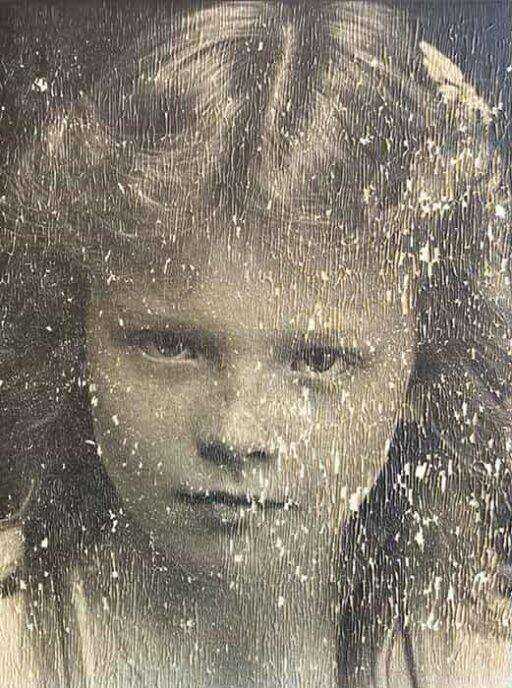
BEFORE
1947 wedding photo with severe water damage and scratches
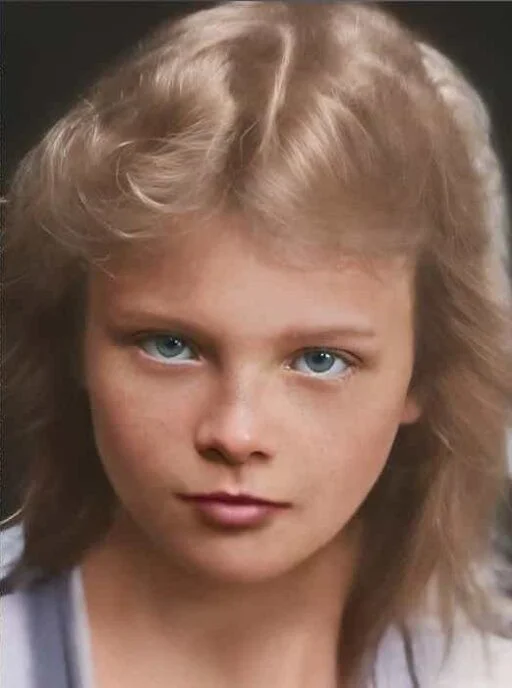
AFTER
Restored with ArtImageHub in 30 seconds
Frequently Asked Questions
What is the best photo restoration software in 2026?▼
ArtImageHub is the best overall photo restoration software for most users in 2026, offering excellent AI restoration quality with a free preview first and a $4.99 original-quality unlock when you want to keep the result. For mobile users, Remini is excellent but requires a $9.99/month subscription. For professionals, VanceAI offers advanced features at $19.9/month.
Is there free photo restoration software?▼
Yes, several options exist: GIMP is completely free and open-source but requires manual editing skills. Photo Restoration by Inpaint offers limited free features. ArtImageHub lets you preview the restore first, then unlock the original-quality download for $4.99 if the result is worth keeping.
What's better: subscription or one-time payment for photo restoration software?▼
Preview-first pricing is more cost-effective if you want a short path to restored downloads without another recurring bill. ArtImageHub's $4.99 original-quality unlock is cheaper than Remini ($119.88/year) or VanceAI ($238.80/year) if you do not need a recurring subscription. Subscriptions make sense only if you need continuous restoration over years or use advanced professional features.
Can photo restoration software fix severely damaged photos?▼
Modern AI photo restoration software can fix many types of damage including scratches, tears, fading, and water damage. However, extremely damaged photos (over 70% missing) may require professional human restoration. Software works best on photos with moderate damage where facial features are still partially visible.
Do I need Photoshop for photo restoration?▼
No, you don't need Photoshop for photo restoration. Modern AI tools like ArtImageHub, Remini, and VanceAI provide automatic restoration that's faster and easier than manual Photoshop work. Photoshop is better for precise manual control but requires significant skill and time investment.
Which photo restoration software is best for genealogy projects?▼
For genealogy projects, ArtImageHub or MyHeritage are best. ArtImageHub offers better value ($4.99 one-time vs $299/year for MyHeritage) and works well with historical photos. MyHeritage integrates with family tree software but costs significantly more. For bulk genealogy work, choose one-time payment software.
How accurate is AI photo restoration?▼
AI photo restoration is 85-95% accurate for well-preserved photos and 60-80% accurate for severely damaged ones. AI "guesses" at missing details based on training data, so it's not 100% historically accurate. Always keep original scans and label AI-restored versions. For archival purposes, use professional human restoration.
Can photo restoration software colorize black and white photos?▼
Yes, most modern photo restoration software includes AI colorization. ArtImageHub, Remini, VanceAI, and MyHeritage all offer colorization. Results vary: well-lit portraits colorize accurately, while indoor/low-light photos may have less accurate colors. Colorization is best used for display purposes, not historical accuracy.
Ready to Restore Your Family Photos?
Preview the workflow first. If the result looks worth keeping, unlock the original-quality download for $4.99 and keep access tied to your email after checkout.
Free preview • $4.99 original-quality unlock • No subscription
Why choose ArtImageHub? Shortest path from software comparison to a paid restore workflow, with one email carrying your access after checkout.